2026-10-15 · BillCrop Team · 4 min read
What to put on an invoice to get paid sooner
What to put on an invoice to get paid faster: a real due date, one contact, a pay link and clear lines. A plain checklist with before and after examples.

You did the work. The client was happy. Then the invoice just… sits there.
If you are wondering what to put on an invoice to get paid faster, start here. Most late payments are not about money. They are about friction. The client is busy, the invoice is unclear, or paying takes too many steps. Fix the friction and many invoices get paid on time.
Here is what to change.
1. What due date should I put on an invoice?
Put a real date, like “Due 30 November 2026”. “Net 30” makes the client do math. Most people will not. They just put it aside.
A real date is clear, goes straight into a calendar and is harder to forget. See net 30 payment terms explained if you still want to use terms too.
2. Who should the client contact about the invoice?
Name one person, with a phone or WhatsApp number and an email, near the top. If there is a question about the invoice, the client should know who to ask.
A question that gets a quick answer gets paid. A question with no one to ask gets ignored.
3. How do I make paying easy?
Put the way to pay at the top, not hidden at the bottom.
- A pay link they can tap from their phone, or
- Your bank name, account name and account number, written clearly.
Every extra step is a reason to wait. If the client can pay in one tap, many will do it on the spot.
4. How detailed should the invoice lines be?
Give each item its own line with its own price. “Website work: ₦250,000” is vague. “Home page design (5 sections): ₦150,000” and “Contact form setup: ₦100,000” are clear.
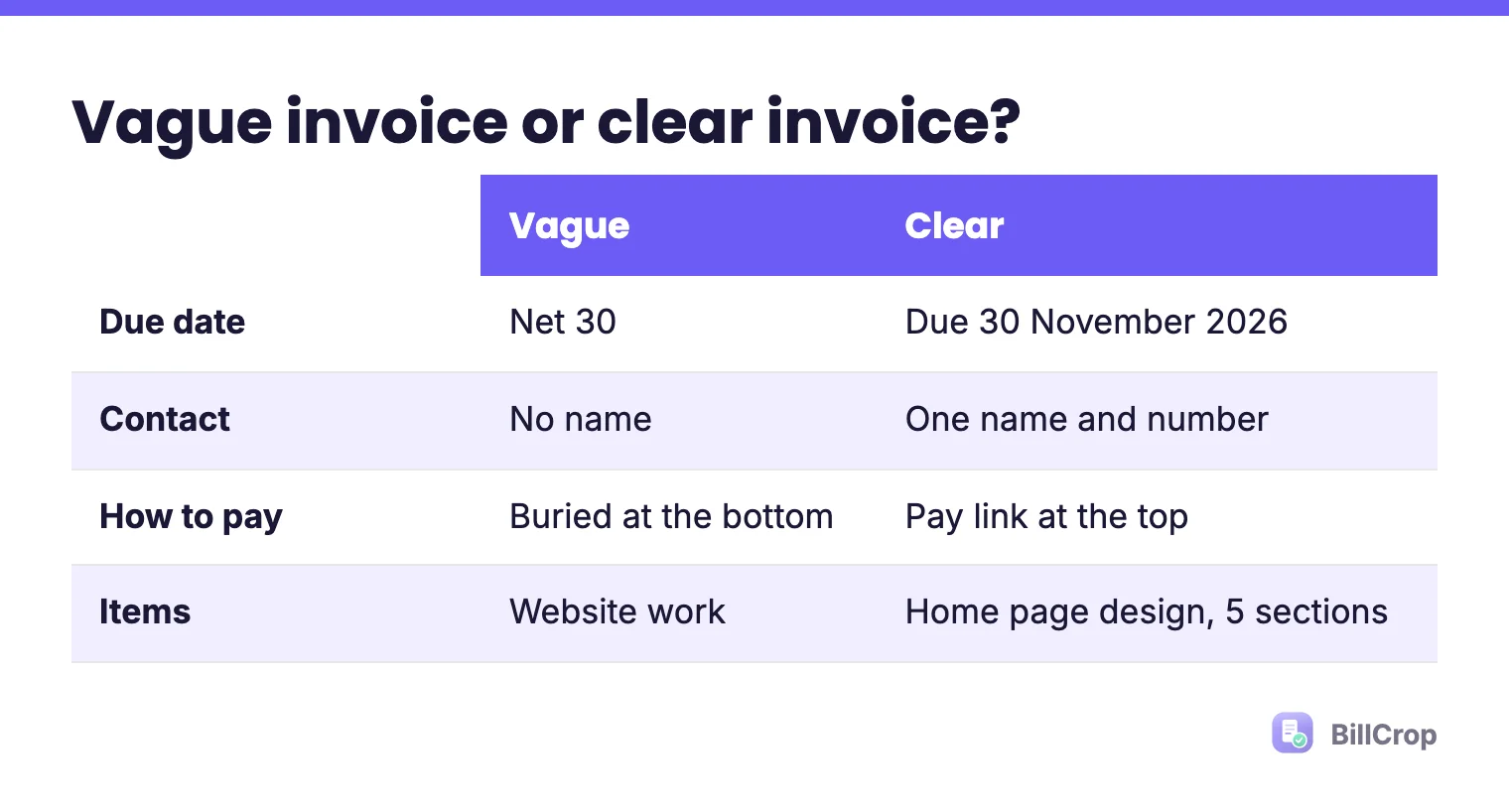
Clear lines mean fewer questions. Fewer questions mean faster payment. If the client is a company, add their purchase order number too, if they gave you one.
5. When should I send the invoice?
Send it the same day you finish the work. The client remembers the good work today. In two weeks they will be thinking about something else.
For big jobs, split the bill. A deposit invoice at the start and a final invoice at the end is easier to pay than one big bill. See how freelancers get paid faster.
6. When should I follow up on an unpaid invoice?
Follow up the day after it is due. Do not wait a month and feel awkward. Send a short, friendly note. Our guide on how to chase unpaid invoices has a full follow-up plan, and our payment reminder guide has messages you can copy.
What else can slow payment down?
A few small things add days:
- A missing client name or wrong company name.
- A total that does not match the lines.
- No invoice number, or the same number used twice. See invoice numbering.
- Sending only a chat message with no file. If you use WhatsApp, send a proper invoice there.
A quick checklist
Before you hit send, check:
- Real due date? ✔
- A name and number to ask questions? ✔
- Pay link or bank details at the top? ✔
- Each item on its own line? ✔
- Sent the day the work was done? ✔
No template yet? Copy our free invoice template and tick every box.
What does a before and after invoice look like?
The same job, billed two ways, shows how small changes help.
Before: “Invoice. Website work: ₦250,000. Terms: Net 30. Pay by bank transfer.” There is no number, no contact and no date. The client has to guess when to pay and who to ask.
After: “Invoice #021. Home page design (5 sections): ₦150,000. Contact form setup: ₦100,000. Total: ₦250,000. Due 30 November 2026. Questions? [Name], [phone]. Pay here: [pay link].” The client knows what, how much, by when and who to call.
The amount is the same. The second one is easy to say yes to. That is the whole trick.
What if my client is a company?
Ask who approves invoices and what they need on it. Many companies need a purchase order number, a company name spelled exactly right and a named contact. Get these before you start. It takes two minutes and can save two weeks.
Let the invoice do the chasing
BillCrop puts a pay link on every invoice and sends polite reminders when one is overdue, so you do not have to write each follow-up yourself. You can try it free for 14 days and send your first invoice today.
Need an invoice right now? Make a clean one in a minute with our free invoice generator.
Free invoice generator →